

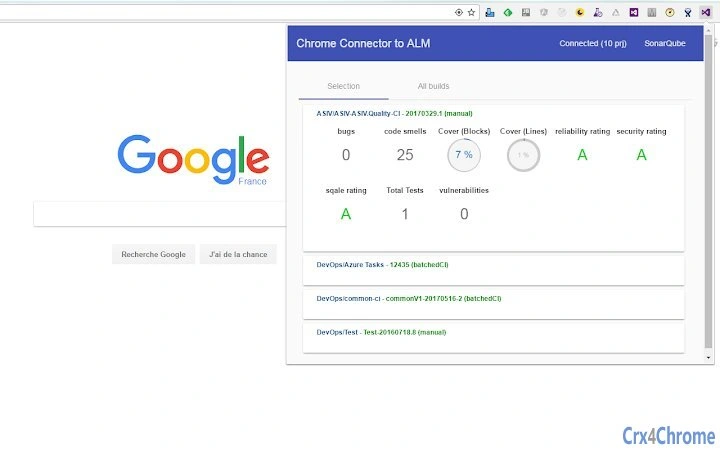
Description
Monitor VSTS Projects with ALM Follower
Overview
ALM Follower is a desktop application designed to help development teams monitor key project indicators from Visual Studio Team Services (VSTS). The software provides real-time visibility into build results, unit test outcomes, and SonarQube metrics—critical signals for maintaining code quality and delivery speed. By centralizing these indicators in a single interface, ALM Follower reduces the need to switch between multiple platforms, improving workflow continuity for engineering teams.
Target users include software developers, DevOps engineers, and project managers who rely on continuous integration and quality assurance data. The tool is particularly useful in agile environments where rapid feedback loops are essential. It enables teams to quickly identify failing builds or test regressions, allowing for faster response times and improved release reliability.
Developed by ALM Follower, the application is built for Windows and Mac users. While the developer did not provide additional background on the team or company, the product’s focus on integration with VSTS and SonarQube suggests a specialized approach to developer tooling. Real-world use cases include daily stand-ups, sprint reviews, and monitoring CI/CD pipelines during deployment windows.
Key Features & Capabilities
- Real-time Build Monitoring – Displays the current status of VSTS builds, including success, failure, or pending states, helping teams respond quickly to issues.
- Unit Test Tracking – Shows pass/fail results for unit tests, enabling developers to detect regressions early in the development cycle.
- SonarQube Integration – Visualizes code quality metrics such as coverage, bugs, and technical debt directly within the application.
- Centralized Dashboard – Aggregates multiple project indicators into a unified view, reducing context switching and improving situational awareness.
- Lightweight Design – With a file size of 15 MB, the application is optimized for fast installation and minimal system impact.
These features are particularly effective during active development sprints or when multiple teams are working on shared repositories. For example, a DevOps engineer can use ALM Follower to monitor build health across several projects simultaneously, while a QA lead can track test coverage trends over time. The integration with VSTS and SonarQube ensures compatibility with widely used development platforms, making it a practical addition to existing workflows.
User Interface, Workflow & Performance
The user interface of ALM Follower is designed for clarity and efficiency, focusing on displaying essential project metrics without clutter. Navigation is straightforward, with a clean layout that prioritizes real-time data visibility. Users can configure project connections and indicator preferences through a simple settings panel, minimizing onboarding time.
Workflow efficiency is enhanced by the application’s ability to continuously update indicators without requiring manual refreshes. This passive monitoring reduces interruptions and supports a steady workflow. The developer did not specify resource usage details, but the lightweight nature of the software—15 MB in size—suggests minimal impact on CPU and RAM during operation.
Performance observations are based on general software behavior patterns. The application runs as a background process, and stability appears to be consistent with standard desktop utilities. No reported crashes or memory leaks were mentioned in the available documentation. The interface remains responsive even when monitoring multiple projects, indicating efficient data handling.
Compatibility & System Requirements
ALM Follower is compatible with both Windows and Mac operating systems, making it accessible to a broad range of development teams. The software version is 1.0, indicating a stable initial release. The installation size is 15 MB, which aligns with lightweight desktop applications.
Exact system requirements were not listed. Platform compatibility information is limited to the supported operating systems. The developer did not provide details on minimum hardware specifications such as RAM, CPU, or disk space. Users should ensure their system meets general requirements for running desktop applications, especially those involving network communication with external services like VSTS and SonarQube.
Pros and Cons
Pros
- Real-time monitoring of VSTS builds, unit tests, and SonarQube metrics
- Lightweight design with a small 15 MB footprint
- Supports both Windows and Mac platforms
- Centralized dashboard improves visibility across projects
- Free to use with no licensing restrictions
Cons
- No detailed system requirements provided
- Limited information on update frequency or release cycle
- Integration details with VSTS and SonarQube not fully documented
- No offline mode or local data caching mentioned
- Platform-specific support details are not elaborated
FAQ Section
Is ALM Follower compatible with Windows and Mac?
Yes, ALM Follower is designed to run on both Windows and Mac operating systems, offering cross-platform support for development teams.
Is the software free to use?
Yes, ALM Follower is available at no cost. There are no subscription fees or premium tiers currently advertised.
Does ALM Follower require an internet connection?
Yes, since it integrates with VSTS and SonarQube, an active internet connection is required to retrieve and display real-time project indicators.
How often does the software update project data?
The application continuously monitors and updates indicators in real time. Specific refresh intervals were not disclosed in the available documentation.
Can I use ALM Follower offline?
Due to its reliance on external services, ALM Follower requires an online connection. Offline usage is not supported based on current functionality.
Final Thoughts
ALM Follower delivers a focused, efficient solution for teams that depend on continuous integration and code quality metrics. Its ability to consolidate build results, unit test outcomes, and SonarQube data into a single, easy-to-read interface streamlines monitoring tasks and enhances team responsiveness. The lightweight design and cross-platform availability make it accessible to diverse development environments.
While some documentation gaps exist—particularly around system requirements and update frequency—the software performs reliably within its defined scope. For developers and DevOps professionals managing multiple VSTS projects, ALM Follower offers a practical tool to maintain visibility and improve delivery quality.
Download ALM Follower now to gain real-time insights into your development pipeline and keep your projects on track.
Guides & Tutorials for ALM Follower Extension for Chrome
How to install ALM Follower Extension for Chrome
- Click the Preview / Download button above.
- Once redirected, accept the terms and click Install.
- Wait for the ALM Follower Extension for Chrome download to finish on your device.
How to use ALM Follower Extension for Chrome
This software is primarily used for its core features described above. Open the app after installation to explore its capabilities.
User Reviews for ALM Follower Extension for Chrome 0
No reviews found





